• Blog
  • Docs
  • Careers
  • Get Support
  • Contact Sales
DigitalOcean
  • Featured AI Products

    Compute

    Build, deploy, and scale cloud compute resources

    Containers and Images

    Safely store and manage containers and backups

    Managed Databases

    Fully managed resources running popular database engines

    Management and Dev Tools

    Control infrastructure and gather insights

    Networking

    Secure and control traffic to apps

    Security

    Help protect your account and resources with these security features

    Storage

    Store and access any amount of data reliably in the cloud

    Browse all products

  • AI/ML

    CMS

    Data and IoT

    Developer Tools

    Gaming and Media

    Hosting

    Security and Networking

    Startups and SMBs

    Web and App Platforms

    See all solutions

  • Community

    Documentation

    Developer Tools

    Get Involved

    Utilities and Help

  • Become a Partner

    Marketplace

  • Pricing
  • Log in
  • Sign up
  • Log in
  • Sign up

Company

  • About
  • Leadership
  • Blog
  • Careers
  • Customers
  • Partners
  • Referral Program
  • Affiliate Program
  • Press
  • Legal
  • Privacy Policy
  • Security
  • Investor Relations

Products

  • GPU Droplets
  • Bare Metal GPUs
  • Inference Engine
  • Data & Learning
  • Evaluations
  • Model Library
  • Droplets
  • Kubernetes
  • Functions
  • App Platform
  • Load Balancers
  • Managed Databases
  • Spaces
  • Block Storage
  • Network File Storage
  • API
  • Uptime
  • Cloud Security Posture Management (CSPM)
  • Identity and Access Management (IAM)
  • Cloudways
  • View all Products

Resources

  • Community Tutorials
  • Community Q&A
  • CSS-Tricks
  • Write for DOnations
  • Currents Research
  • DigitalOcean Startups
  • Wavemakers Program
  • Compass Council
  • Open Source
  • Newsletter Signup
  • Marketplace
  • Pricing
  • Pricing Calculator
  • Documentation
  • Release Notes
  • Code of Conduct
  • Shop Swag

Solutions

  • AI Training GPU
  • GPU Inference
  • VPS Hosting
  • Website Hosting
  • VPN
  • Docker Hosting
  • Node.js Hosting
  • Web Mobile Apps
  • WordPress Hosting
  • Virtual Machines
  • View all Solutions

Contact

  • Support
  • Sales
  • Report Abuse
  • System Status
  • Share your ideas

Company

  • About
  • Leadership
  • Blog
  • Careers
  • Customers
  • Partners
  • Referral Program
  • Affiliate Program
  • Press
  • Legal
  • Privacy Policy
  • Security
  • Investor Relations

Products

  • GPU Droplets
  • Bare Metal GPUs
  • Inference Engine
  • Data & Learning
  • Evaluations
  • Model Library
  • Droplets
  • Kubernetes
  • Functions
  • App Platform
  • Load Balancers
  • Managed Databases
  • Spaces
  • Block Storage
  • Network File Storage
  • API
  • Uptime
  • Cloud Security Posture Management (CSPM)
  • Identity and Access Management (IAM)
  • Cloudways
  • View all Products

Resources

  • Community Tutorials
  • Community Q&A
  • CSS-Tricks
  • Write for DOnations
  • Currents Research
  • DigitalOcean Startups
  • Wavemakers Program
  • Compass Council
  • Open Source
  • Newsletter Signup
  • Marketplace
  • Pricing
  • Pricing Calculator
  • Documentation
  • Release Notes
  • Code of Conduct
  • Shop Swag

Solutions

  • AI Training GPU
  • GPU Inference
  • VPS Hosting
  • Website Hosting
  • VPN
  • Docker Hosting
  • Node.js Hosting
  • Web Mobile Apps
  • WordPress Hosting
  • Virtual Machines
  • View all Solutions

Contact

  • Support
  • Sales
  • Report Abuse
  • System Status
  • Share your ideas
© 2026 DigitalOcean, LLC.Sitemap.
Product updates

Per-Bucket Access Keys Now Available for DigitalOcean Spaces

author

By Diane Hannay

  • Published: January 14, 2025
  • 3 min read
<- Back to blog home

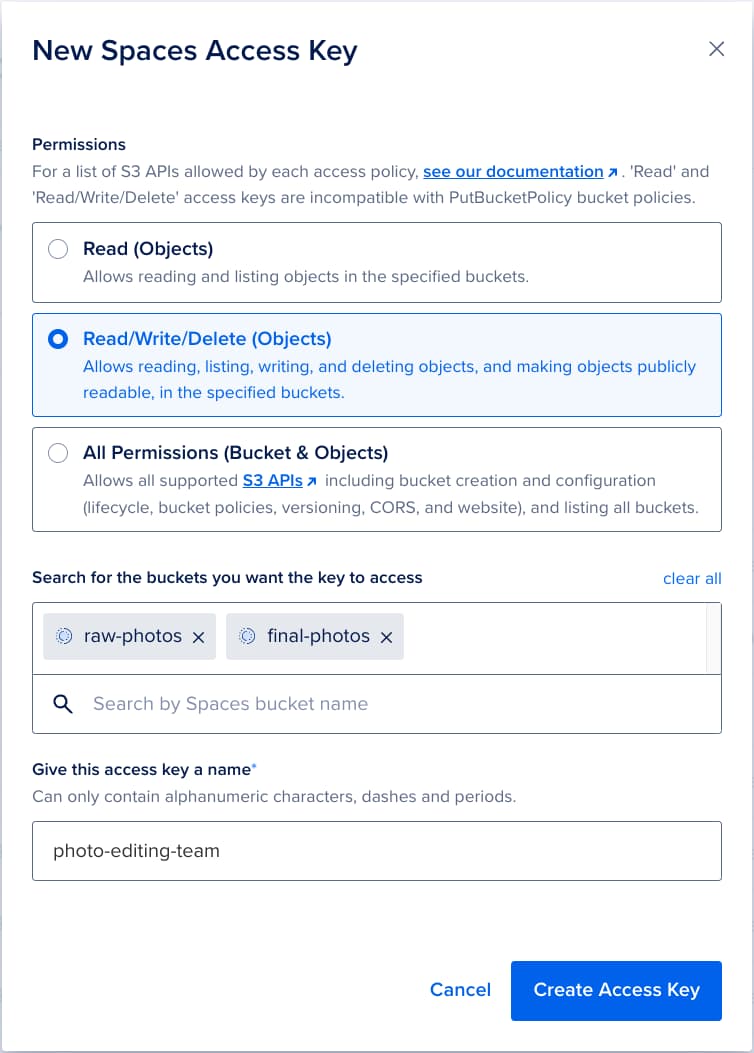
We’re excited to announce the general availability of Per-Bucket Access Keys for DigitalOcean Spaces Object Storage. This highly requested feature gives you fine-grained control over who can access specific storage buckets with read-only or read/write permissions, making it easier to secure and manage your data.
spaces per bucket screenshot

What Are Per-Bucket Access Keys?

With Per-Bucket Access Keys, you can assign unique access credentials with read-only or read/write permission for individual buckets. This enables the right level of access to be granted to different teams, S3-compatible applications and use cases, without over-permissioning.

A Real-World Example

Let’s say you’re running a photography business with three storage buckets:

  • Raw Photos: Only accessible by your editing team.
  • Final Photos: Your client portal needs read-only access, while your editing team needs read-write access.
  • Marketing Materials: Your social media automation tools need read-only access to this bucket.

Before Per-Bucket Access Keys, controlling access to these buckets could get tricky. Now, you can:

  • Create a “Read/Write/Delete” access key for the photo editing team to interact with your Raw Photos and Final Photos buckets.
  • Generate a “Read” access key for your client portal, restricted to the Final Photos bucket.
  • Assign a “Read” access key for your social media tools to access the Marketing Materials bucket.

Key Benefits

Per-Bucket Access Keys open up a range of new possibilities for businesses and developers:

  • Enhanced Security: Help ensure applications and team members only have access to the data they need.
  • Multi-Tenant Environments: Better safeguard customer data by isolating access for each tenant.
  • Environment Isolation: Keep development, staging, and production environments separate within the same account.
  • Application-Specific Access: Reduce the impact of a compromised access key by limiting its scope to a single bucket.
  • Secure File Sharing: Share content from one bucket without exposing content from any other buckets.

Security Best Practices

This new feature makes it easier to adopt the principle of least privilege, where users and applications are granted only the permissions they require. Here are some recommendations:

  • Use separate keys for different applications and team members.
  • Opt for “Read” access keys whenever possible.
  • Opt for “Read/Write/Delete” access keys over “All Permissions” keys whenever possible.
  • Regularly review and rotate your access keys.
  • Combine Per-Bucket Access Keys with presigned URLs to enable user-specific file uploads without granting broad bucket access.

Future Enhancements

We’re continuously working to improve the user experience and capabilities of Per-Bucket Access Keys. Here’s what’s on the horizon:

  • API and CLI Support: By mid-2025, you’ll be able to create Per-Bucket Access Keys through the DigitalOcean API and CLI, in addition to the DigitalOcean Control Panel.
  • S3-Compatible Bucket Policy Support: Compatibility with S3-compatible bucket policies (PutBucketPolicy) is in progress and expected to be available by mid-2025.

Get Started Today

Per-Bucket Access Keys are available now in all DigitalOcean regions at no additional cost. To get started:

  1. Visit the Access Keys tab (see image below) on the Spaces Object Storage page in the DigitalOcean Control Panel.
  2. Create keys with “Read” or “Read/Write/Delete” permissions for specific buckets.
  3. Refer to our documentation for detailed guidance.
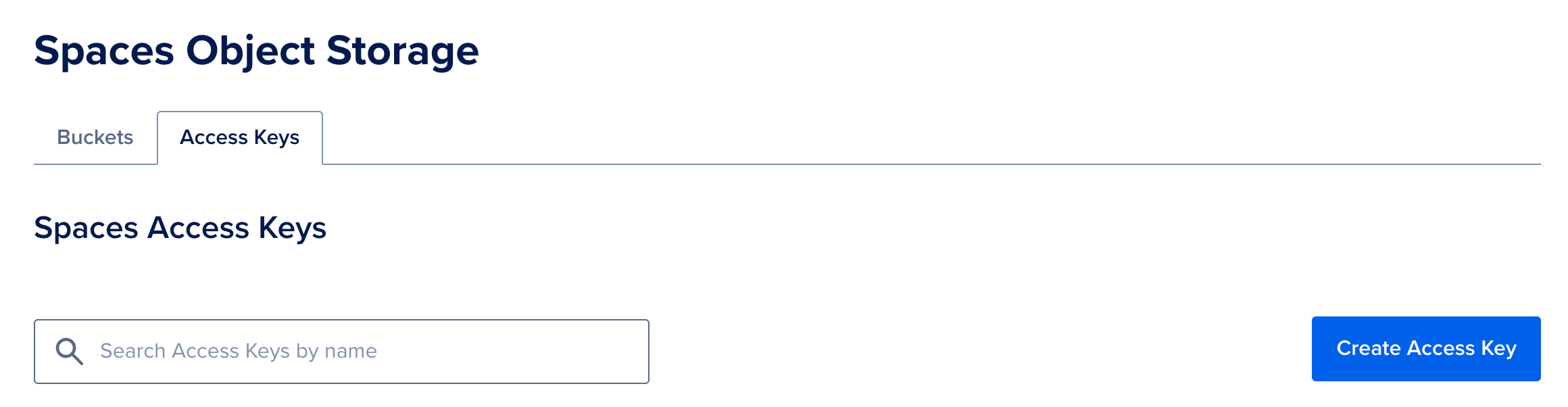
image alt text
Visit the Access Keys tab to create a new Access Key

If you haven’t tried Spaces Object Storage yet, now’s the perfect time to explore how seamless and affordable it is for your Kubernetes, App Platform, and Droplets storage needs. Try it today!

About the author

Diane Hannay
Diane Hannay
Author
See author profile
See author profile

Share

    Start building today

    From GPU-powered inference and Kubernetes to managed databases and storage, get everything you need to build, scale, and deploy intelligent applications.
    Sign up

    Related Articles

    Built for Mass Scale: Hard-Won Lessons from Teams Running High Volume Inference Workloads in Production
    AI/ML

    Built for Mass Scale: Hard-Won Lessons from Teams Running High Volume Inference Workloads in Production

    Hasan Nabulsi
    • July 2, 2026
    • 5 min read

    Read more

    DigitalOcean Evaluations: Production Model and Router Testing for the Inference Stack
    Product updates

    DigitalOcean Evaluations: Production Model and Router Testing for the Inference Stack

    Grace Morgan
    • July 1, 2026
    • 3 min read

    Read more

    Run Codex in the cloud – DigitalOcean for Codex is now available
    Product updates

    Run Codex in the cloud – DigitalOcean for Codex is now available

    Ari Sigal
    • June 25, 2026
    • 3 min read

    Read more