Streamline Your Workflow: Announcing Environment Support for DigitalOcean App Platform


By Waverly Swinton and Bikram Gupta
- Published:
- 5 min read
As developers, we love building, but we also know that as an application portfolio grows, managing it gets complicated. The line between your production services, your staging environment, and your new feature-branch deployments can blur. Keeping track of which app serves which purpose and quickly identifying all your “production” apps at a glance becomes a significant organizational challenge.
We’re excited to announce a powerful new way to manage this complexity: Environment Support for DigitalOcean App Platform, powered by DigitalOcean Projects. We’re also introducing App Cloning, a new feature to replicate your apps in just a few clicks.
This feature allows you to explicitly tag your resource groups (Projects) with a specific environment, such as Development, Staging, or Production and then assign your App Platform apps to those projects. This gives you a high-level, filterable view of your entire application landscape, right from the control panel and via the CLI.
The Core Concept
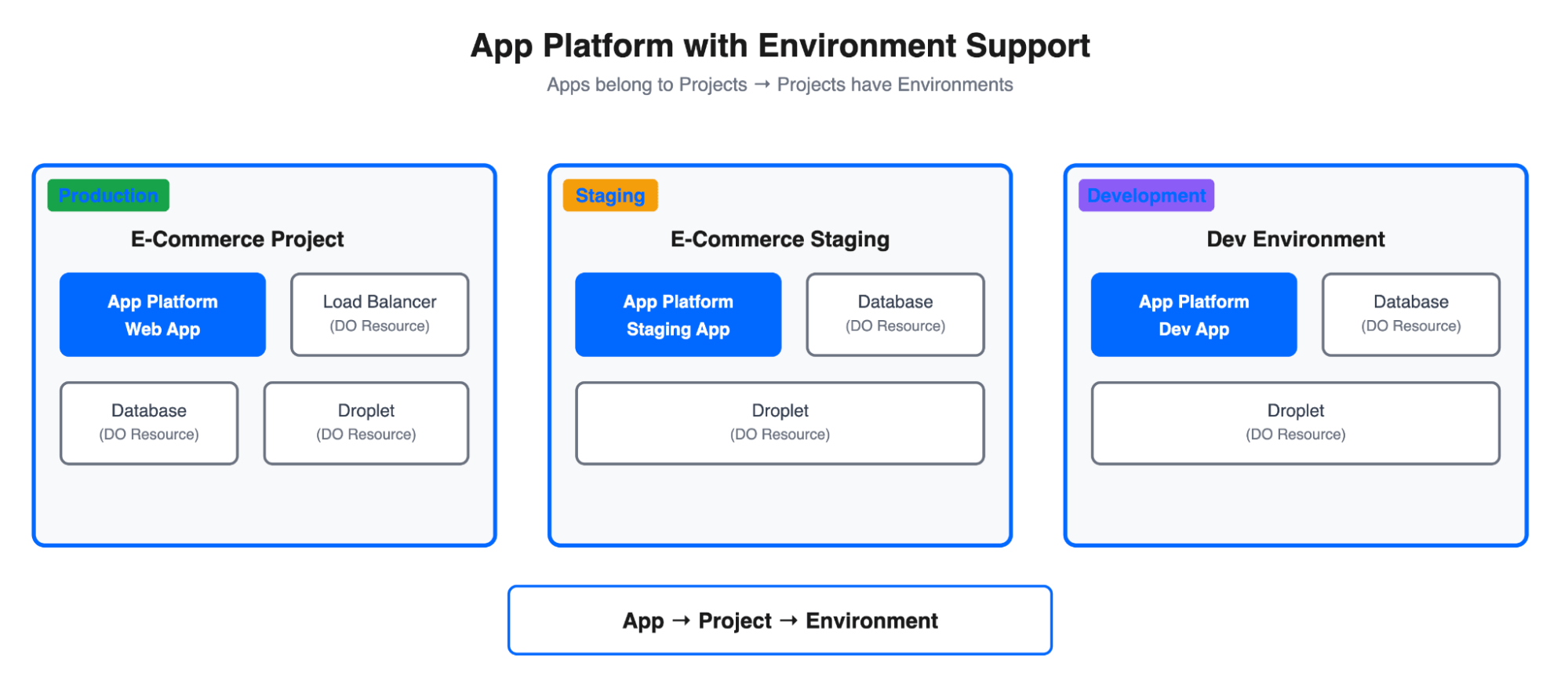
The logic is simple but effective:
-
A Project is a “bucket” for your resources. You can group Droplets, Load Balancers, Databases, and App Platform Apps into a single Project.
-
A Project can now be assigned an environment. This flag formally designates that project’s purpose.
-
An App Platform App is assigned to a Project.
By combining these, you can now associate an app with an environment, enabling clearer organization, better cost management, and more robust scripting and automation.
Configuring Environments in the UI
You can manage all of this directly from the DigitalOcean Control Panel.
When you create a new project (Click “New Project” from the main dashboard), you’ll see a new “Environment” dropdown. Here, you can select Development, Staging, or Production to define the project’s role.
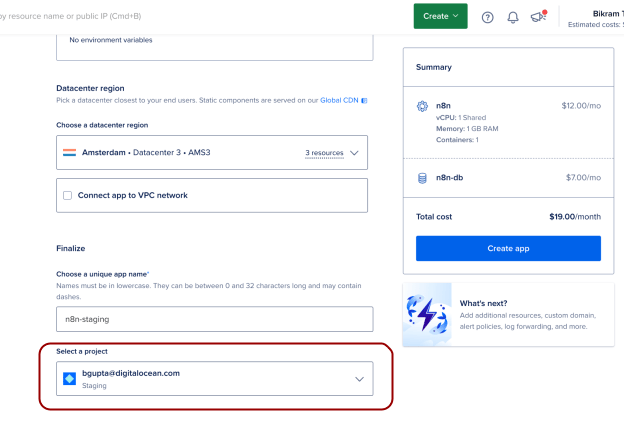
Once your project is created, simply select it during the App Platform app creation wizard. All resources for that app will now be associated with your environment-tagged project.
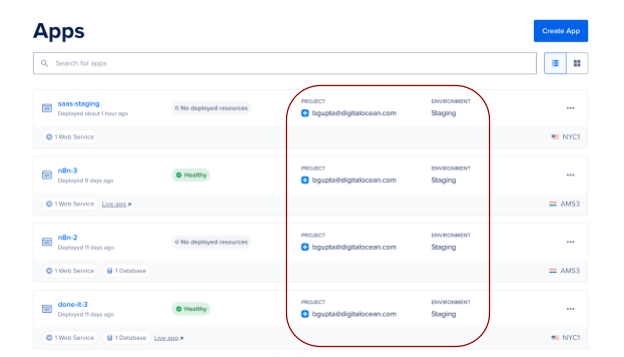
Managing Environments with doctl
For those of us who live in the terminal, this entire workflow is supported by doctl, the DigitalOcean command-line tool.
Let’s walk through the end-to-end process.
Step 1: Create an Environment-Tagged Project
First, we’ll create a new project. The doctl projects create command now includes an --environment flag, which accepts Development, Staging, or Production.
# Command to create a new project for our staging environment

$ doctl projects create --name "saas-staging-project" \

  --purpose "Staging environment for our main SaaS app" \

  --environment "Staging"


# Output

ID                                      Owner UUID                              Owner ID    Name
Description                                     Purpose                                   Environment    Is Default?
Created At              Updated At

c4f2b0a8-6f17-4e6f-9b8f-1a2b3c4d5e6f    a34997bf-6ff4-4aa1-bb9f-4e4dd08ea790    8198484     saas-staging-project
Update your project information under Settings    Staging environment for our main SaaS app    Staging        false
2025-11-10T14:30:00Z    2025-11-10T14:30:00Z
Make a note of that new Project ID (c4f2b0a8-…).
Step 2: Create an App and Assign it to the Project
Next, when we create our new App Platform app, we use the --project-id flag to assign it to the project we just created.
# Command to create a new app from a spec and assign it to our project

$ doctl apps create --spec /path/to/my-staging-app.yaml \

  --project-id "c4f2b0a8-6f17-4e6f-9b8f-1a2b3c4d5e6f"


# Output (snipped for brevity)

ID                                      Spec Name       Default Ingress    ...    Created At

01c03d96-43bb-4da9-ba54-0b215c44a498    saas-staging    ...                     2025-11-10T14:32:15
Our new app (01c03d96-…) is now organizationally linked to the “Staging” environment.
Step 3: Find an App’s Environment
How do you find the environment for an app you’ve already deployed? While it requires two API calls (getting the app’s project_id, then getting the project’s environment), you can easily chain these calls together on the command line using doctl and jq.
Here is a one-liner that takes an App ID, finds its project, and prints a summary of the app’s project and environment:
APP_ID="01c03d96-43bb-4da9-ba54-0b215c44a498"; doctl projects get $(doctl apps get "$APP_ID" -o json | jq -r
 '.[0].project_id') -o json| jq -r --arg APP_ID "$APP_ID" '.[0] | "App ID: \($APP_ID)\nProject: \(.name)\nEnvironment: \\(.environment)"'
And the output shows us exactly what we need:
App ID: 01c03d96-43bb-4da9-ba54-0b215c44a498

Project: bgupta@digitalocean.com

Environment: Staging
This gives you a powerful and scriptable way to confirm an app’s environment right from your terminal.
Accelerate Your Workflow with App Cloning
Managing environments gets even easier with another new feature: App Cloning. This new capability is the perfect companion to environment-tagged Projects, as it allows you to quickly replicate an application to stand up a new environment.
You can now create a new app that is based on an existing one. From your app’s main page, just click the “Actions” menu and select “Clone app.”
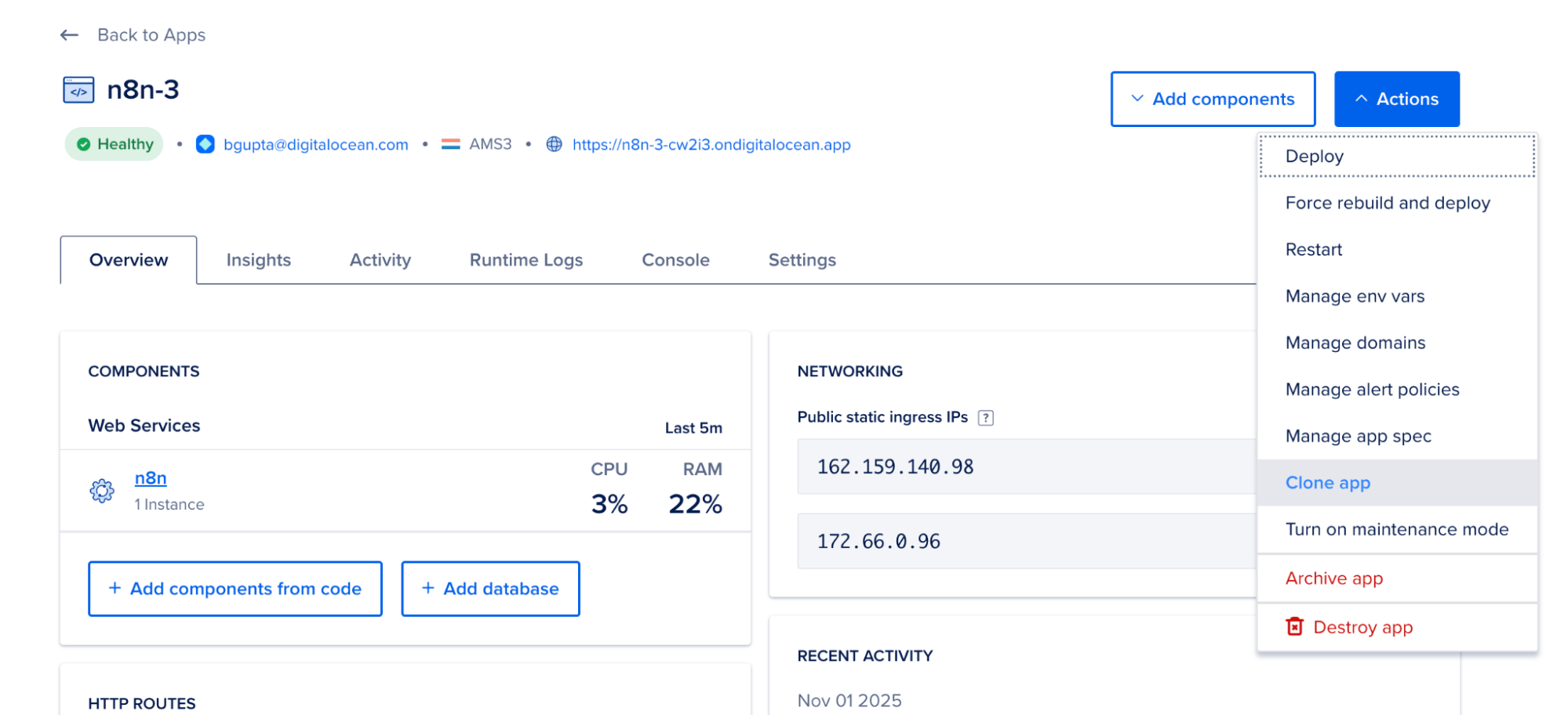
This will take you to a creation wizard that is pre-filled with all the settings from your original app, including its components, configuration, and non-encrypted environment variables.
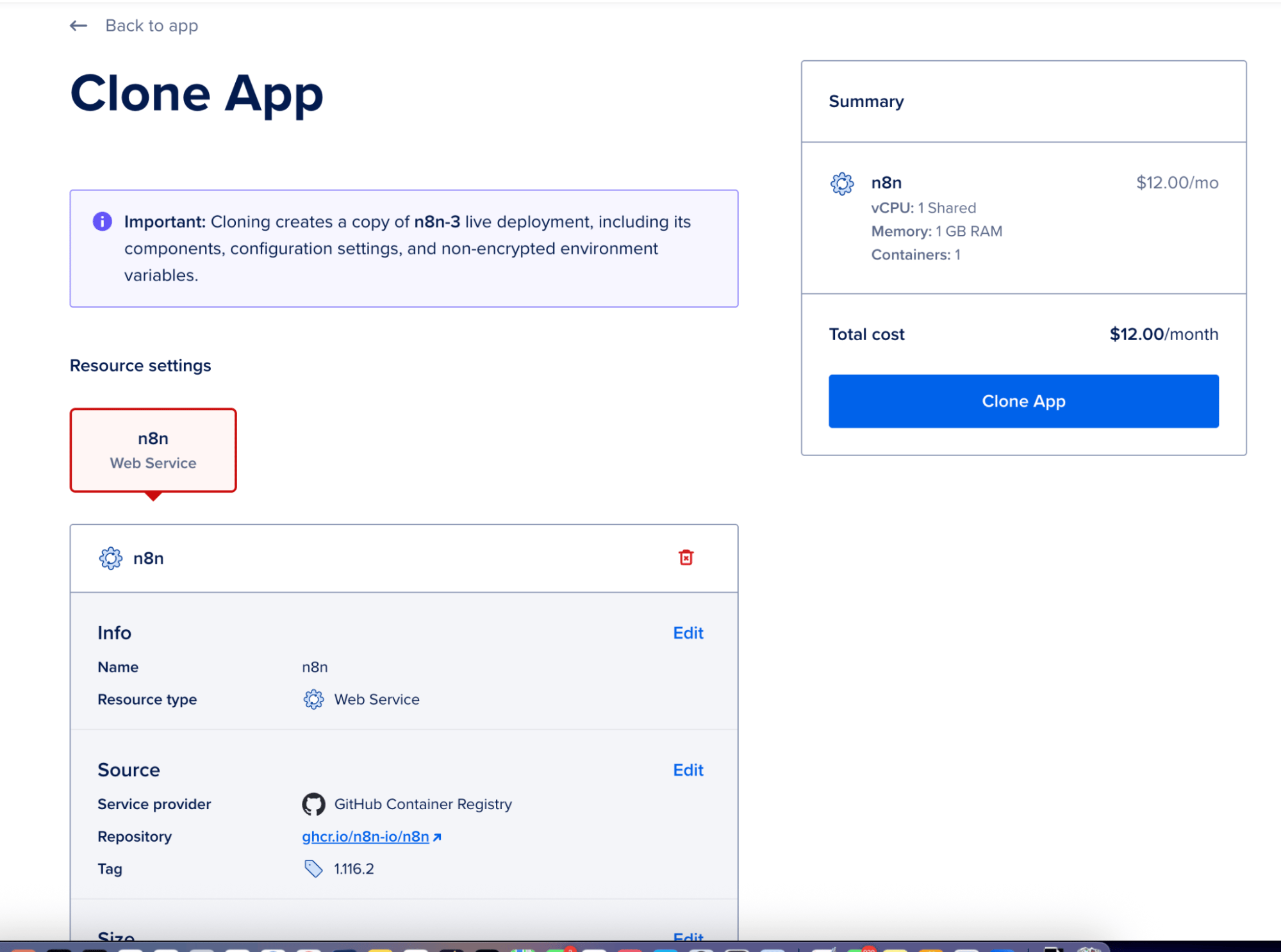
- This fully customizable template allows you to change anything about the new app during the cloning process, including source code, instance size, build commands, environment variables, datacenter region, VPC settings, and the App name.
For example, to spin up a new testing environment, you can simply clone your production app. In the “Clone App” wizard, you would:
-
Change the Project to your “Staging” or “Development” project.
-
Update the Environment Variables to point to your development database or staging API keys.
-
Give it a new name, like my-app-staging.
This makes it faster and more reliable than ever to create parallel environments for development, testing, or feature branches.
Start Organizing
This integration of App Platform with environment-aware Projects, combined with the new App Cloning workflow, is a huge step toward simplifying the management of complex application deployments. You can now see at a glance which apps serve which purpose, helping you prevent costly mistakes and build more robust automation for your CI/CD pipelines.
For more information, check out the official docs for App Platform and Projects.
We can’t wait to see how you use it!
About the author(s)


Related Articles
Introducing v5 Droplets: next-generation performance, sized to your workload
Krishna Nallamothu
- August 26, 2026
- 2 min read
Private Preview: DigitalOcean Managed Agents Runtime Services
Salman Paracha
- August 25, 2026
- 3 min read
DigitalOcean Inference Router, Now Cache-Aware: Why the Cheapest Model Isn't Always the Best Deal
Salman Paracha
- August 20, 2026
- 10 min read