A Practical Droplet Performance Comparison

By Reynold Harbin
- Published:
- 6 min read
Benchmarks are a common way to measure and compare the performance of cloud compute servers. While standardized benchmarks are useful for establishing a consistent, broad set of comparison metrics, it can be useful and more practical to compare the performance of the actual tasks you run most often on your servers as well.
For example, how much time could you save when running your app’s automated test scripts if you used a more powerful cloud server?
We compared the performance of Standard and Optimized Droplets when doing just this. Specifically, we used the basic React Boilerplate app, which includes a comprehensive set of testing scripts covering 99% of the project. Because the tests are CPU-intensive, we chose test execution time as our comparison metric for the two different Droplet configurations.
Server Setup and Testing Methodology
For the default environment, we used a Standard $40 Droplet, which is configured with 4 vCPUs (Intel Xeon CPU E5-2650L v3 @ 1.80GHz), 8GB of RAM, and 160GB of SSD storage.
For the comparison environment, we used an Optimized $40 Droplet, which is configured with 2 dedicated vCPUs (Intel Xeon CPU E5-2697A v4 @ 2.60GHz), 4GB of RAM, and 25GB of SSD storage.
Both Droplets were running Ubuntu 16.04, and we set both up using the following procedure.
After initial setup to create a non-root user and basic firewall, we verified the CPU architecture using lscpu. We installed Node.js using the PPA to get a recent version of Node.js that includes npm, the Node.js package manager, which we needed to execute the test scripts. Finally, we installed React Boilerplate by cloning the react-boilerplate repository and running `npm run setup` to install its dependencies.
At this point, we had everything we needed to run the tests. To measure the time it takes to execute them, we used the utility program time, which summarizes the time and system resource usage for a given program command.
As a baseline, we first compared Droplet performance when running React Boilerplate’s test suite with its default settings using `time npm test`.
Because npm uses a test framework that can use all available processors, we also ran a single CPU comparison to better understand the impact of CPU on performance. For the single CPU comparison, we ran `time npm test – --runInBand` to force all of the automated tests to run sequentially. This test is relevant for applications that are not designed to use multiple CPUs, where a more powerful processor can improve performance.
Additionally, we found that setting the number of worker nodes to match the number of vCPUs on the server yielded the fastest overall test execution time, so we compared the best case setup on both servers as well. For the vCPU-specific comparison, we ran `time npm test – --maxWorkers=4` for the Standard Droplet (which has 4 vCPUs) and `time npm test – --maxWorkers=2` for the Optimized Droplet (which has 2 vCPUs).
We ran each of these tests five times on each server to look at the average execution time over a larger sample size.
So, how did the Standard and Optimized Droplets perform?
Results
Here’s an example (truncated for length) of the output from time npm test on the Optimized Droplet:
> react-boilerplate@3.5.0 pretest /home/perfaccount/react-boilerplate > npm run test:clean && npm run lint […] PASS app/containers/App/tests/index.test.js PASS app/containers/LocaleToggle/tests/index.test.js […] PASS app/containers/HomePage/tests/actions.test.js Test Suites: 76 passed, 76 total Tests: 289 passed, 289 total Snapshots: 4 passed, 4 total Time: 14.725s, estimated 33s Ran all test suites. ---------------------------------|----------|----------|----------|----------|----------------| File | % Stmts | % Branch | % Funcs | % Lines |Uncovered Lines | ---------------------------------|----------|----------|----------|----------|----------------| All files | 100 | 100 | 100 | 100 | | app | 100 | 100 | 100 | 100 | | configureStore.js | 100 | 100 | 100 | 100 | | […] sagaInjectors.js | 100 | 100 | 100 | 100 | | ---------------------------------|----------|----------|----------|----------|----------------| real 0m22.380s user 0m23.512s sys 0m0.884s
The output we’re interested in is `real` time, which is the actual elapsed wall-clock time it took to execute the tests. In this example, the test script completed in 22.380 seconds.
These are our results showing the average execution time across multiple runs:
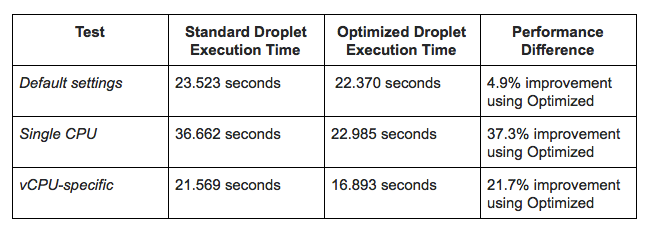
The Optimized Droplet outperformed the Standard Droplet in all tests, but as we explain in the next section, this isn’t the only factor to consider when choosing the right configuration for your use case.
Conclusions
When comparing cloud servers with the goal of optimizing price-to-performance and resources, it’s important to test the applications that you plan to run on the server in addition to comparing standard benchmarks.
In measuring the execution times of the react-boilerplate project’s automated tests, our results showed a small improvement of 4.9% when using a $40 Optimized Droplet compared to a $40 Standard Droplet. For applications that perform similarly and do not take full advantage of all CPUs, choosing the $40 Standard Droplet may be a better choice because of its additional memory (8GB vs 4GB) and larger SSD (160GB vs 25GB).
However, the Optimized Droplet executed 37.3% faster when running the tests sequentially. For compute-intensive applications that use a single vCPU, this difference may be significant enough to choose the Optimized Droplet for the same price as the Standard Droplet.
If your application can run in a clustered mode with a specific number of CPU resources, you may be able to optimize price to resources by using a Standard Plan with more CPU, RAM and SSD versus a lower number of higher powered CPUs. We saw the best performance on both Droplets when we set the number of application instances to match the number of available vCPUs, where Optimized Droplets still outperformed Standard Droplets by a significant 21.7%, though the additional RAM and SSD in Standard Droplets may be preferable.
The tests performed in this article are not designed to be comprehensive, but are tailored to the types of applications that typically consume time and CPU resources. To maximize price-to-performance and resources for your applications, you can test various Droplet configurations and measure execution times of the typical jobs you place on your servers.
Test Droplets for Your Apps
About the author

Related Articles

Introducing v5 Droplets: next-generation performance, sized to your workload
Krishna Nallamothu
- August 26, 2026
- 2 min read
Private Preview: DigitalOcean Managed Agents Runtime Services
Salman Paracha
- August 25, 2026
- 3 min read
DigitalOcean Inference Router, Now Cache-Aware: Why the Cheapest Model Isn't Always the Best Deal
Salman Paracha
- August 20, 2026
- 10 min read